AI Assistant in Tests
Last updated: August 19, 2026
The AI Assistant is built into the HackerRank platform to support you during your test.
The AI Assistant operates in the following modes:
Unguarded: Allows you to interact freely with the AI, similar to real-world AI coding tools and agent-style workflows.
Guarded: Provides help with syntax, platform navigation, and conceptual guidance but does not generate complete solutions.
Note: The hiring company sets the AI Assistant mode for your test.
If your test includes the AI Assistant:
The onboarding instructions clearly mention it before the test starts.
The AI Assistant appears as a panel in your coding or project environment when the test begins. If you do not see the AI Assistant panel, the feature is not enabled for your test.
Note: The AI Assistant is available for the following question types:
Coding
Database
Data Science
Projects
Front-end
Back-end
Full-stack
Mobile
Generative AI
Code Repository
Key capabilities
The capabilities available to you depend on the AI Assistant mode configured for your test.
In Guarded Mode, you can use the AI Assistant to:
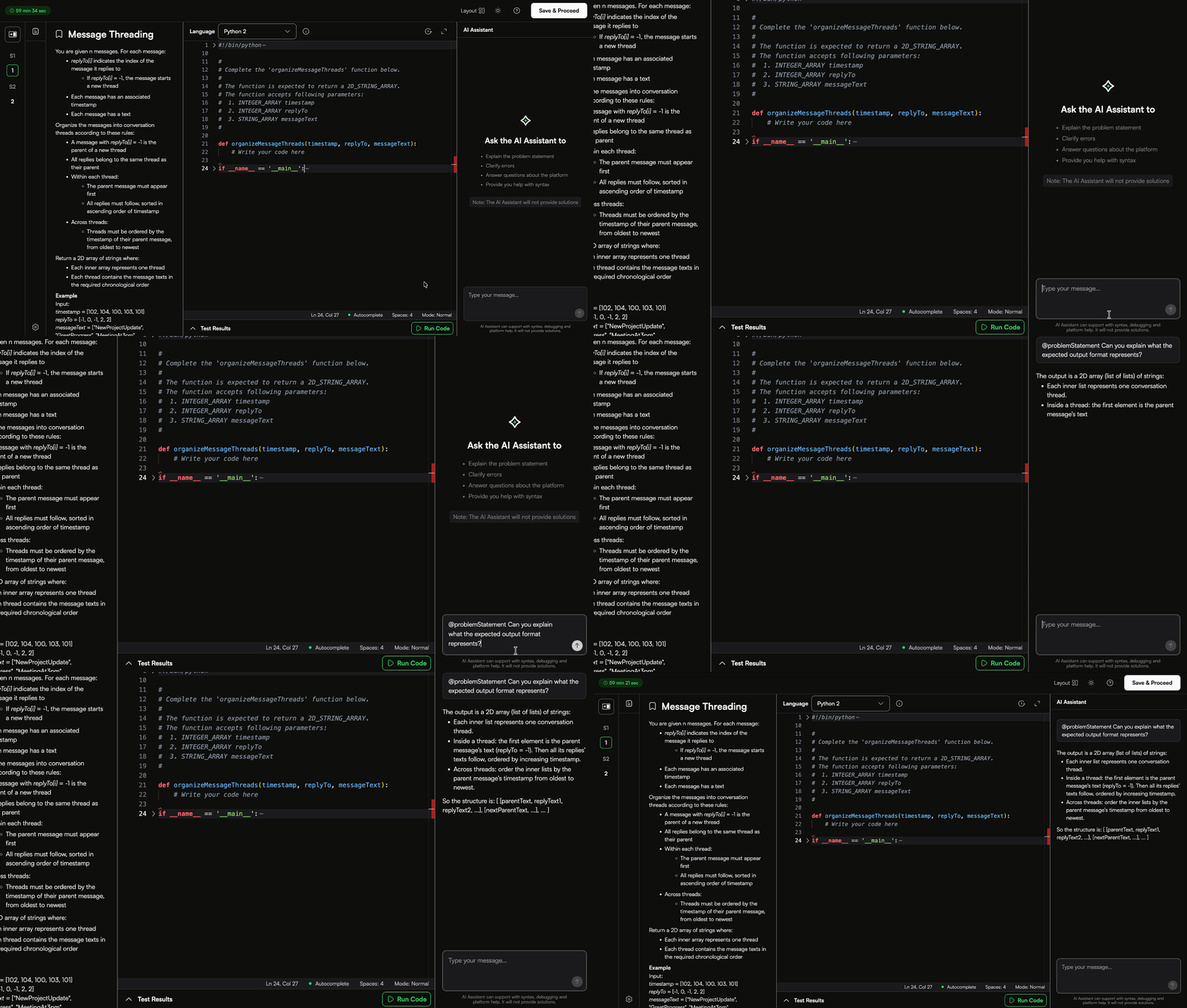
Understand the codebase: Ask about specific files or functions to understand what they do.
Navigate the Project: Get help identifying where to make changes across multiple files.
Debug errors: Share error messages from the terminal and get help understanding them.
Platform support: Learn how to run, test, or access features in the HackerRank IDE.
Syntax help: When appropriate, the AI Assistant may suggest templates or syntax. You can either copy the suggestions or insert them directly at your cursor.
In Unguarded Mode, you can use the following features.
Plan Mode: You can create and refine an implementation plan before you write any code. The AI Assistant explores the problem and produces a structured plan that covers requirements, constraints, edge cases, and suggested tests, without generating any code. When you are ready to build, switch to Agent Mode to implement the plan.
Ask Mode: You can ask questions about the problem, your code, or specific files. You must tag the
problem statementto provide context. The AI Assistant uses the tagged content to generate accurate responses.Agent Mode: You can switch to a mode for extended, multi-step interactions. You can ask the AI Assistant to write or edit code, explain logic, or perform tasks.
Inline Code Completions: As you type, the AI Assistant suggests code directly in the editor. You can accept or ignore these suggestions.
Model Switching: You can switch between available AI models such as Claude Opus 5, Claude Sonnet 5, Gemini-3.5 Flash, GPT-5.6 Luna, GPT-5.6 Sol, and GPT-5.6 Terra. By default, the AI Assistant uses GPT-5.6 Terra.
Note:
For the Projects and Code Repositories question, click Apply to place the code into the current file at the cursor’s position.
All AI-suggested code is optional. You have full control over what to use and how to apply it in your solution.
Feature availability by mode
The table below shows the availability of AI Assistant features in each mode:
Feature | Guarded Mode | Unguarded Mode |
Plan Mode | Not Available | Available |
Ask Mode | Available | Available |
Agent Mode | Not Available | Available |
Inline Code Completions | Not Available | Available |
Model Switching | Not Available | Available |
Interaction and scoring
Using the AI Assistant does not affect your score. However, the platform records your interaction with the AI Assistant and makes it visible to your test evaluator.
Best practices
Use the AI Assistant when you feel stuck or need clarification.
Do not rely on the AI Assistant to solve the entire problem. It cannot provide full solutions.
Take a sample test before your assessment to familiarize yourself with the test interface.
FAQs
Can I choose not to use the AI Assistant?
Yes. The AI Assistant is optional. Use it as much or as little as you prefer.
Does the AI Assistant provide full answers or solutions?
No. The AI Assistant does not generate full working solutions. It guides your thought process but does not replace your problem-solving skills.
Can I ask conceptual questions, such as how a sorting algorithm works?
Yes. You can ask about concepts, syntax, or general programming topics, especially if they help you progress during the test.
Does my evaluator see what I type in the AI Assistant?
Yes. The platform records your conversation with the AI Assistant and makes it visible to your evaluator. However, it is not used for automatic scoring.
Is the AI Assistant available in every test?
No. The test setter must enable the AI Assistant. If you do not see the AI Assistant panel in your test environment, it is likely not available for that test.